
Posted on Jul 24, 2026 · Updated Jul 24, 2026 · 9 min read
Azure Cost Optimization: A Practical Guide for CTOs
Azure cost optimization is the ongoing practice of balancing cloud infrastructure spend against measurable business value — not a one-time audit, but a continuous discipline requiring architectural decisions, pricing model selection, and automated governance working in concert. The Microsoft Azure Well-Architected Framework defines cost-optimized workloads as those that balance actual costs against perceived business value through ongoing monitoring and iterative improvement, a framing that shifts the goal from pure cost-cutting to financial precision.
Three tools anchor any serious Azure cost management effort: the Microsoft Azure Well-Architected Framework for architectural guidance, Azure Advisor for surfacing idle and overprovisioned resources, and the SpendArk Cloud Cost Calculator for pre-deployment multi-cloud cost modeling. Getting the most from Azure requires engaging all three.
TL;DR
Azure cost optimization combines the right pricing model per workload (Reserved Instances save up to 72%), automated governance through Azure Policy and Advisor, and pre-deployment cost modeling. Cost optimization is iterative, not a one-time project — establish a baseline, tag everything, and review recommendations weekly.
Table of contents

Core concepts at a glance
- Cost optimization is iterative, not a one-time project
- Establish a cost baseline before deploying production workloads
- Evaluate pay-as-you-go versus commitment-based pricing for every stable workload
- Regional pricing differences can reduce costs without any architectural change
- Tagging resources enables accurate cost allocation and forecasting
- Automation enforces guardrails; human judgment executes the savings
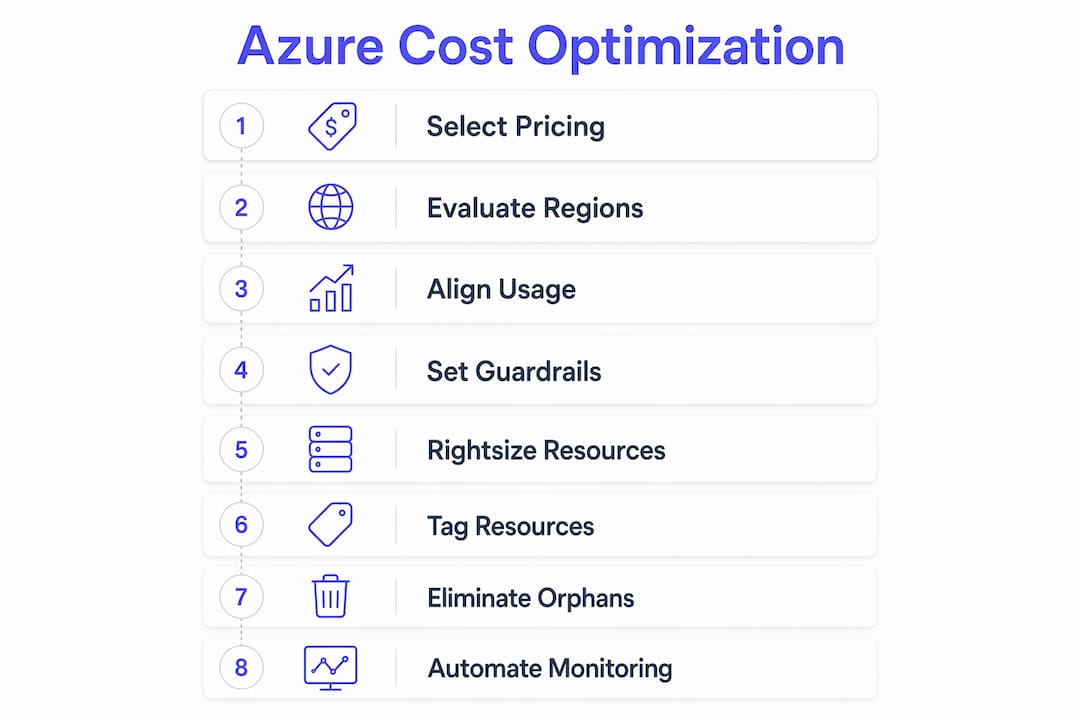
Key strategies to reduce Azure costs without sacrificing performance
Choose the right pricing model for each workload
Azure offers five primary billing models: pay-as-you-go, Reserved Instances (up to 72% savings vs. list price on 1- or 3-year terms), Azure Savings Plans provide discounts on eligible compute, Pre-Purchase Plans, and Spot Instances offer substantial discounts for interruptible workloads. No single model fits every workload. Stable, predictable compute warrants Reserved Instances; dynamic or cross-region workloads benefit more from Savings Plans, which apply discounts automatically without requiring you to specify a service or region.
Pro tip
Combine Reserved Instances with Savings Plans. Azure applies RI discounts first, then Savings Plan discounts cover remaining eligible usage up to your hourly commitment — layering both maximizes coverage without over-committing.
Targeting coverage with commitment-based plans is a widely cited best practice. Committing to 100% of baseline compute spend creates lock-in risk when architecture changes; keeping 30–40% on pay-as-you-go or Spot absorbs variable demand without penalty.
Evaluate regional pricing before you deploy
Regional pricing differences can reduce your bill without touching a single line of application code. Azure pricing varies by region for identical SKUs, and non-production environments (dev, staging, QA) rarely need to run in the same region as production. Deploying lower environments to less expensive regions, where latency requirements are relaxed, is one of the fastest wins available to startup engineering teams.
Align resource usage to billing increments
Azure charges per second for VMs, per minute for some services, and per hour for others. Misalignment between usage and billing increments causes billing leakage: a VM running 6 minutes 45 seconds on a per-minute meter is billed for 6 minutes, but a workload that runs 61 minutes on an hourly meter pays for a full second hour. Scheduling batch jobs and CI/CD pipelines to respect these boundaries eliminates a category of waste that rarely appears in cost reports.
Set spending guardrails with infrastructure-as-code and Azure Policy
Guardrails prevent expensive provisioning mistakes before they reach your bill. Infrastructure-as-code tools (Terraform, Bicep, ARM templates) enforce approved SKU lists, region constraints, and resource limits at deployment time. Azure Policy adds a governance layer that blocks non-compliant resources from being created at all. Together, automation combined with Azure Policy guardrails prevents the drift that accumulates when developers provision resources manually without cost visibility.
Rightsize resources using utilization metrics
Azure Advisor flags VMs with CPU utilization at 5% or below and network usage at 7 MB or below for four or more consecutive days as low-utilization candidates. Acting on those recommendations — resizing from, say, Standard_D8s_v3 to Standard_D2s_v3 — delivers immediate savings. The Azure Cost Management tutorial walks through the resize workflow step by step, including how to verify utilization metrics before committing to a change.

Tag every resource from day one
Tagging is the foundation of cost allocation. Without consistent tags (environment, team, cost center, application), cost reports aggregate into undifferentiated totals that make it impossible to identify which team or service is driving spend. Enforce tagging through Azure Policy at resource creation, not as a retroactive cleanup exercise. Teams that tag consistently can build per-service cost models, set team-level budgets, and detect anomalies at the workload level rather than the subscription level.
Identify and eliminate orphaned resources
Orphaned resources — unattached managed disks, idle load balancers, unused public IP addresses, empty resource groups with lingering services — accumulate silently and appear as low-signal line items in cost reports. A monthly audit using Azure Cost Management's cost analysis view, filtered by resource type and zero-utilization signals, surfaces these reliably. Deleting or deallocating them has no performance impact and no architectural tradeoff.
How automation sustains Azure cost management over time
Automation is the mechanism that converts one-time cost reviews into continuous cost governance. Azure Advisor generates recommendations, but human action executing those recommendations is what produces actual savings. The gap between a recommendation appearing in the portal and an engineer acting on it is where cloud waste accumulates.
Azure Cost Management + Billing provides the operational layer: budget alerts, anomaly detection, cost forecasts, and exportable cost data for downstream analysis. Setting budget alerts at 80% and 100% of monthly thresholds gives engineering teams early warning before overruns occur. Anomaly detection flags deviations from rolling baselines, catching runaway workloads or misconfigured auto-scaling before they compound.
Key automation and tooling practices:
- Use Azure Policy to block non-compliant resource creation at deploy time
- Schedule non-production VMs to shut down outside business hours using Azure Automation or VM auto-shutdown
- Set budget alerts at multiple thresholds (50%, 80%, 100%) per subscription and resource group
- Enable anomaly detection in Azure Cost Management to catch unexpected spend spikes
- Export cost data to Azure Data Lake or Power BI for team-level reporting and accountability
- Review Azure Advisor recommendations on a weekly cadence and assign ownership for each flagged item
- Use cost management tools to evaluate whether native Azure tooling meets your reporting needs or whether third-party platforms add value at your scale
Cloud cost estimation tools, including SpendArk
Accurate cost modeling before deployment prevents the most expensive category of Azure waste: overprovisioned architectures that were never sized against real usage data.
Native Azure estimation tools
The Azure Pricing Calculator estimates monthly costs by service, region, and configuration. Azure Migrate assesses on-premises workloads and produces right-sized Azure recommendations with projected costs. The Total Cost of Ownership (TCO) Calculator compares on-premises versus Azure costs for migration planning. These tools are authoritative for single-cloud Azure estimates but do not support multi-cloud comparison natively.
SpendArk Cloud Cost Calculator
For developers and startup CTOs evaluating multi-cloud architecture costs, SpendArk compares AWS, Azure, and GCP pricing side by side with instant estimates. Pre-configured templates cover the most common startup architectures: SaaS, WordPress, REST API, static site, ecommerce, mobile backend, serverless, and data pipeline. Teams that do not fit a template can build custom architectures from scratch, adjust scale parameters, and get immediate cost projections across all three providers.
A bill-based estimation path lets teams import existing AWS spend to model equivalent Azure or GCP costs, which is particularly useful for startups evaluating a cloud migration or a multi-cloud strategy without committing to a full proof-of-concept deployment.
SpendArk features relevant to Azure cost planning:
- Side-by-side AWS, Azure, and GCP pricing with no account required
- Pre-built templates for eight common architecture patterns
- Custom architecture builder with adjustable scale inputs
- Instant cost estimates for scenario comparison
- Bill-based path for estimating from existing AWS spend
- Free to use, with no subscription or commitment
Integrating a cloud cost calculator into the architecture decision workflow at the design phase, before infrastructure-as-code templates are written, sets a realistic budget baseline and surfaces cost tradeoffs between providers before they become sunk costs.
SpendArk gives you a cost baseline before you commit to Azure
Most Azure cost overruns originate at the architecture design stage, when SKU choices and scaling assumptions are made without a concrete cost model. SpendArk's free cloud cost calculator lets developers and CTOs compare Azure, AWS, and GCP pricing across pre-configured architecture templates or custom builds, producing instant estimates that inform both provider selection and right-sizing decisions before a single resource is provisioned.
For teams already running on Azure, SpendArk's multi-cloud comparison makes it straightforward to validate whether your current architecture is cost-competitive or whether a hybrid approach would reduce your monthly bill. Use the calculator now to model your architecture costs across all three major providers.
Key takeaways
Sustained Azure cost reduction requires combining the right pricing models, automated governance, and pre-deployment cost modeling from tools like SpendArk.
| Point | Details |
|---|---|
| Commitment coverage target | Targeting 30–40% coverage with pay-as-you-go or Spot absorbs variable demand without penalty. |
| Billing increment alignment | Scheduling workloads to match Azure's per-second, per-minute, or per-hour billing increments eliminates leakage from partial usage rounds. |
| Automation plus human action | Azure Advisor surfaces recommendations, but only human execution of those recommendations converts them into actual savings. |
| Tagging and guardrails | Enforcing resource tags and Azure Policy at deployment time enables team-level cost allocation and prevents non-compliant provisioning. |
| SpendArk for pre-deployment modeling | SpendArk's free calculator compares AWS, Azure, and GCP pricing side by side using pre-built templates or custom architectures before any resources are provisioned. |
Recommended reading: Cloud Cost Optimization Checklist: 15 Ways to Save (2026), Azure Price Estimator: Forecast Cloud Costs (2026), Cloud Cost Calculator — Compare AWS, Azure & GCP Pricing and Azure Cost Management vs Third-Party Tools (2026), and GCP Cost Optimization: A Practical Guide (2026).
Frequently asked questions
What is Azure cost optimization?
Azure cost optimization is the ongoing practice of balancing cloud infrastructure spend against measurable business value. It is not a one-time audit but a continuous discipline that combines the right pricing model per workload, automated governance through Azure Policy and Azure Advisor, and pre-deployment cost modeling with tools like the SpendArk Cloud Cost Calculator.
How much can Reserved Instances save on Azure?
Reserved Instances can save up to 72% versus list price on 1- or 3-year terms for stable, predictable compute. Azure Savings Plans offer more flexible discounts that apply automatically across eligible compute without requiring a specific service or region commitment. Combining both — RI discounts applied first, Savings Plan discounts covering the remainder — maximizes coverage without over-committing.
What percentage of Azure spend should stay on pay-as-you-go?
A widely cited best practice is keeping 30–40% of baseline compute spend on pay-as-you-go or Spot Instances rather than committing 100% to Reserved Instances or Savings Plans. Committing all baseline spend creates lock-in risk when architecture changes; the 30–40% buffer absorbs variable demand without penalty.
Why does Azure Advisor alone not reduce costs?
Azure Advisor generates recommendations — flagging low-utilization VMs, orphaned resources, and rightsizing opportunities — but it does not act on them automatically. Human action executing those recommendations is what produces actual savings. The gap between a recommendation appearing in the portal and an engineer acting on it is where cloud waste accumulates, which is why a weekly review cadence with assigned ownership matters.
Want someone to find it for you?
Send us your billing export and we'll send back every waste item we find, each with the dollar amount it costs you per month and the exact change to make. No credentials — you export the data yourself. From $1,500, delivered in 5 business days. If we don't find at least 3× the fee in annualised savings, you pay nothing.